
- Our Article
Oil and Gas Fleet Management in India:
GPS, Fuel Monitoring & Safety Guide
By combining GPS tracking, fuel monitoring, telematics, driver behaviour and maintenance data, fleet managers can monitor trips, control fuel-related exceptions, improve safety and respond faster to operational issues.
A connected fleet approach helps oil and gas businesses manage vehicles with greater visibility, control and reliability.
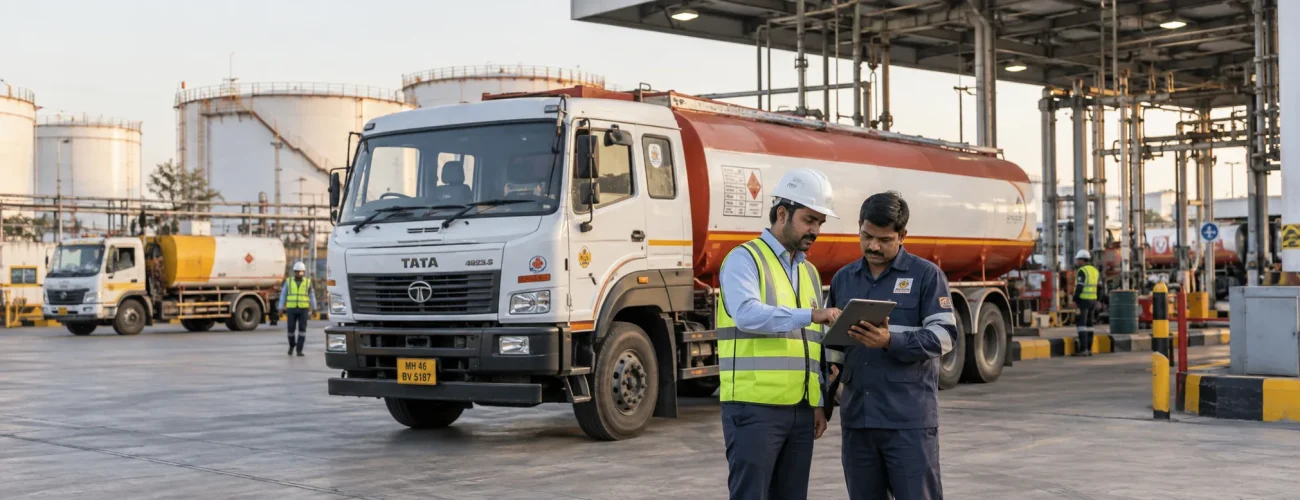
Why Oil and Gas Fleet Operations Need Better Visibility
Oil and gas transportation can involve tankers, service trucks, utility vehicles, maintenance vehicles and other commercial assets operating across multiple locations.
Unlike a fleet working from one local depot, these vehicles may travel long distances and spend significant time away from direct supervision.
Common operational challenges include:
- Limited visibility into vehicle movement
- Long-distance trip monitoring
- Route deviations
- Unplanned stoppages
- High fuel consumption
- Unusual fuel activity
- Excessive idling
- Driver safety concerns
- Vehicle downtime
- Maintenance planning
- Underutilized assets
Managing these issues separately creates fragmented information.
A connected fleet-management approach brings location, vehicle, driver and operational data together so fleet managers can investigate what is happening more efficiently.
What Should an Oil and Gas Fleet Manager Monitor?
Tracking every available data point does not automatically improve fleet performance.
Fleet managers should focus on information connected to real operational decisions.
Important areas include:
Vehicle Location and Movement
Know where active vehicles are and whether they are moving, stopped or inactive.
Trip Progress
Monitor whether vehicles are progressing toward planned destinations and identify significant delays.
Fuel Activity
Review fuel consumption, refuelling events and unusual fuel-level changes where compatible monitoring hardware is installed.
Driver Activity
Identify recurring behaviours such as speeding, harsh braking, harsh acceleration or excessive idling.
Vehicle Health
Monitor maintenance schedules and available vehicle diagnostic information.
Operational Exceptions
Prioritize events that require action instead of overwhelming fleet teams with unnecessary alerts.
This creates a more practical operational dashboard.
GPS Tracking for Oil and Gas Fleets
GPS tracking provides the location foundation of connected fleet operations.
Instead of relying entirely on driver phone calls, fleet managers can monitor vehicle movement through a centralized platform.
Useful information can include:
- Current location
- Previous route
- Trip distance
- Vehicle movement
- Stops
- Arrival time
- Departure time
- Route deviations
Consider a tanker travelling between a distribution terminal and a customer location.
The operations team can follow:
Vehicle dispatched
→ Trip starts
→ Vehicle follows planned route
→ Unexpected stoppage occurs
→ Operations team reviews location
→ Vehicle continues
→ Destination reached
This creates greater visibility throughout the trip.
Go Beyond Vehicle Location with Real-Time Fleet Visibility
Knowing a vehicle’s GPS coordinates answers only one question:
Where is the vehicle?
Fleet managers often need more context.
Real-time fleet visibility can help answer:
- Is the vehicle moving?
- Has it stopped?
- How long has it been stationary?
- Is the trip progressing normally?
- Has the vehicle left its expected route?
- Has an operational alert been generated?
This changes vehicle tracking from a simple map function into an operational management tool.
For fleets with vehicles spread across multiple locations, this broader view can help teams prioritize the vehicles that actually need attention.
Use Geofencing Around Important Fleet Locations
A geofence is a virtual boundary around a physical location.
For oil and gas operations, geofences can be created around areas such as:
- Terminals
- Depots
- Loading points
- Unloading locations
- Customer facilities
- Workshops
- Project sites
- Restricted operating areas
Fleet managers can then review vehicle entry and exit activity.
Example
A vehicle arrives at a terminal.
The system records:
Geofence entry
→ time at location
→ geofence exit
This can help managers understand:
- Arrival time
- Departure time
- Dwell time
- Unexpected site visits
- Delayed loading or unloading
Geofencing therefore provides operational context around location data.
Fuel Monitoring for Better Cost and Consumption Control
Fuel is one of the most important operating costs for many heavy commercial fleets.
But total fuel expenditure alone does not explain why costs are increasing.
Fleet managers need to look deeper.
Depending on the vehicle, tank configuration, sensor and integration, fuel monitoring may provide information such as:
- Recorded fuel level
- Refuelling activity
- Significant fuel drops
- Fuel history
- Consumption trends
- Vehicle-wise fuel behaviour
This information can help identify which vehicles or events require further investigation.
Monitor Refuelling Activity
A significant increase in recorded tank level can indicate a refuelling event.
Fleet teams can review the event alongside:
- Vehicle
- Location
- Date
- Time
- Trip history
This creates a more structured fuel record.
Rather than looking only at monthly fuel bills, managers can understand fuel activity at the vehicle level.
Investigate Unexpected Fuel Drops
An unexpected reduction in recorded fuel level may require attention.
Possible causes can include:
- Fuel removal
- Leakage
- Maintenance activity
- Sensor behaviour
- Vehicle operating conditions
A fuel-level change alone should not automatically be treated as evidence of theft.
A stronger investigation process is:
Unexpected fuel drop
→ Check vehicle location
→ Check whether vehicle was moving or stationary
→ Review the event time
→ Compare fuel history
→ Review operational context
→ Investigate where necessary
This gives fleet managers more information before making a conclusion.
Track Fuel Efficiency by Vehicle
Fuel monitoring should not focus only on theft or fuel loss.
Fuel efficiency can provide a broader view of fleet performance.
A basic formula is:
Fuel Efficiency = Distance Travelled ÷ Fuel Consumed
For example:
Distance travelled = 1,800 km
Fuel consumed = 300 litres
Fuel efficiency:
1,800 ÷ 300 = 6 km/L
The number should be evaluated in context.
Compare:
- The same vehicle across different periods
- Similar vehicles
- Similar routes
- Comparable loads
- Similar operating conditions
Avoid applying one mileage benchmark to every vehicle.
Heavy trucks, tankers and support vehicles can have very different operating profiles.
Measure Fuel Cost Per Kilometre
Fleet managers can also calculate how much fuel expense is generated for every kilometre travelled.
Formula:
Fuel Cost per KM = Total Fuel Cost ÷ Total Kilometres
Example:
Monthly fuel expenditure = ₹1,65,000
Distance travelled = 11,000 km
Fuel cost:
₹1,65,000 ÷ 11,000 = ₹15/km
If the number begins increasing, investigate:
- Fuel efficiency
- Idling
- Route distance
- Fuel price
- Driver behaviour
- Vehicle condition
This makes fuel data more actionable.
Reduce Avoidable Idling
A vehicle does not need to travel to consume fuel.
An engine running while stationary can increase fuel consumption without increasing productive distance.
Fleet managers can review:
- Total idle duration
- Frequent idle locations
- High-idling vehicles
- Recurring driver patterns
Some idling may be operationally necessary.
The objective is therefore not zero idling.
It is identifying avoidable idling that adds cost without providing operational value.
Monitor Route Deviations and Unplanned Stops
Not every route deviation is a problem.
Traffic congestion, road closures or customer instructions can require a driver to change route.
However, repeated or unexplained deviations should be visible to fleet managers.
A practical workflow is:
Route deviation identified
→ Review current vehicle location
→ Compare planned and actual route
→ Check stoppage information
→ Contact driver when required
→ Record the reason
This creates accountability without treating every deviation as an incident.
Improve Driver Safety Through Behaviour Monitoring
Driver behaviour has a direct relationship with fleet safety and can also influence operating costs.
Connected systems may identify events such as:
- Speeding
- Harsh acceleration
- Harsh braking
- Excessive idling
The purpose should not be to punish drivers for every event.
Fleet managers should look for patterns.
Example Driver Safety Workflow
Repeated speeding events occur.
→ Identify the vehicle and driver
→ Review route conditions
→ Check event frequency
→ Discuss the pattern with the driver
→ Provide coaching where needed
→ Monitor future performance
This turns driver data into an improvement process rather than simply another alert.
Add Video Context with Fleet Dashcams
Telematics can show that an event occurred.
Dashcam footage can help explain what happened around it.
Consider a harsh-braking event.
Fleet data may show:
- Vehicle
- Time
- Location
- Speed
- Driver
Available dashcam footage can provide visual context.
This can support:
- Incident investigation
- Driver coaching
- Accident review
- Dispute assessment
- Fleet safety analysis
Video and telematics therefore work best when used together.
Build Preventive Maintenance Around Vehicle Usage
Unexpected breakdowns can reduce fleet availability and disrupt planned trips.
Preventive maintenance helps fleets schedule service before predictable problems become failures.
Maintenance planning may use:
- Kilometres travelled
- Engine hours
- Time intervals
- Previous service history
- Vehicle condition
- Manufacturer recommendations
Typical maintenance areas include:
- Engine service
- Brake inspection
- Lubrication
- Tyres
- Suspension
- Fluids
- Electrical systems
- Safety equipment
A consistent maintenance program supports vehicle availability and long-term operating control.
Use Engine Hours Where Kilometres Do Not Tell the Full Story
Some vehicles can accumulate significant engine use while travelling relatively little distance.
Examples include vehicles experiencing:
- Long stationary operations
- Heavy idling
- Slow-moving site activity
- Extended loading or waiting periods
Where engine-hour information is available, fleet managers can combine:
Kilometres travelled
Engine hours
Maintenance history
This can create a better picture of actual vehicle usage.
Use CAN Bus Data for Deeper Vehicle Insights
Modern commercial vehicles generate information through electronic control systems.
Where vehicle compatibility and integration allow, CAN Bus monitoring may provide data such as:
- Engine RPM
- Engine hours
- Coolant temperature
- Engine load
- Diagnostic information
- Fuel-related parameters
Available parameters vary by vehicle manufacturer and model.
Fleet managers should therefore confirm which data is accessible rather than assuming every vehicle provides the same information.
CAN Bus data can complement GPS and telematics by adding vehicle-level operating context.
Monitor Tyre Condition as Part of Fleet Reliability
Tyres influence several areas of commercial fleet performance:
- Safety
- Fuel consumption
- Vehicle availability
- Maintenance cost
Where suitable tyre-pressure monitoring systems are installed, fleets may be able to monitor abnormal pressure conditions and temperature.
However, digital monitoring should complement—not replace—regular physical tyre inspection.
The most effective approach combines technology with good maintenance practices.
Measure Vehicle Utilization
A fleet can own many vehicles while still operating inefficiently.
Vehicle utilization helps managers understand whether available assets are being used productively.
A simple calculation is:
Vehicle Utilization Rate = Productive Vehicle Time ÷ Available Vehicle Time × 100
Low utilization may indicate:
- Excess vehicle capacity
- Poor allocation
- Uneven dispatching
- Vehicle downtime
Extremely high utilization can also create challenges if maintenance windows are consistently delayed.
The goal is not simply maximum use.
It is appropriate utilization with sufficient vehicle availability and maintenance time.
Track Empty Kilometres
A vehicle may be moving without carrying a productive load.
Those kilometres still consume:
- Fuel
- Tyres
- Maintenance life
- Driver time
A useful formula is:
Empty KM % = Empty Kilometres ÷ Total Kilometres × 100
For example:
Total distance = 10,000 km
Empty distance = 1,500 km
Empty kilometres:
1,500 ÷ 10,000 × 100 = 15%
Monitoring this metric can help operations teams identify opportunities for better dispatch and return-trip planning.
KPIs Oil and Gas Fleet Managers Should Monitor
A good fleet dashboard does not need dozens of unrelated numbers.
Focus on metrics tied to actual operational decisions.
| KPI | What It Helps Evaluate |
|---|---|
| Fuel Efficiency | Fuel consumption performance |
| Fuel Cost per KM | Fuel operating cost |
| Total Cost per KM | Overall vehicle operating cost |
| Idle Time | Non-productive engine activity |
| Vehicle Utilization | Productive fleet usage |
| Empty KM % | Non-productive vehicle movement |
| Vehicle Uptime | Fleet availability |
| Unplanned Downtime | Unexpected vehicle loss |
| Maintenance Compliance | Scheduled servicing performance |
| Driver Risk Events | Recurring driving-risk patterns |
| On-Time Trip Performance | Trip reliability |
The most useful comparison is usually not a generic industry number.
Compare:
Vehicle vs its previous performance
or
Vehicle vs similar vehicles performing similar work
That provides a more meaningful internal baseline.
Turn Fleet Alerts Into Operational Workflows
More alerts do not automatically produce better fleet management.
Fleet managers need a clear response process.
Fuel Exception
Unexpected fuel activity
→ Review fuel history
→ Check vehicle location
→ Check movement status
→ Investigate if required
Route Exception
Unexpected route deviation
→ Check location
→ Review route
→ Contact driver when necessary
→ Record reason
Driver Exception
Repeated safety event
→ Review driver history
→ Check operating context
→ Provide coaching
→ Monitor future trend
Maintenance Exception
Vehicle reaches service threshold
→ Schedule service
→ Complete inspection
→ Record maintenance
→ Return vehicle to operation
This is the difference between collecting fleet data and using fleet data.
How Telematics Connects Fleet Operations
Different fleet technologies answer different questions.
GPS Tracking
Where is the vehicle?
Geofencing
Has it entered or left an important location?
Fuel Monitoring
What is happening with vehicle fuel?
Driver Monitoring
How is the vehicle being driven?
CAN Bus Integration
What vehicle operating data is available?
Dashcam
What happened visually around an event?
Maintenance Management
When does the vehicle require attention?
Telematics can bring these information sources into a more connected operational environment.
The value is not simply having more data.
The value is understanding how different events relate to each other.
How Diselmap Supports Oil and Gas Fleet Operations
Diselmap provides connected fleet technologies designed to improve visibility across vehicles, drivers, fuel activity and fleet operations.
Depending on vehicle requirements and available integrations, fleets can use capabilities such as:
- GPS tracking
- Fleet telematics
- Fuel monitoring
- Geofencing
- Driver behaviour monitoring
- Real-time fleet visibility
- Dashcam and 360° camera solutions
- Preventive maintenance management
- CAN Bus integration
- Tyre-pressure monitoring
- Fleet alerts and reporting
Instead of viewing each system separately, fleet managers can use connected information to investigate operational problems.
For example:
Fuel operating cost increases
→ Compare fuel efficiency
→ Review idling
→ Check route distance
→ Identify high-cost vehicles
→ Investigate causes
Or:
Vehicle availability falls
→ Review downtime
→ Check maintenance history
→ Identify recurring issues
→ Improve maintenance planning
This creates a more structured approach to fleet management.
A Practical Fleet Monitoring Strategy
Oil and gas operators do not need to implement every fleet technology at the same time.
Start with the operational problem.
Step 1: Identify the Problem
Examples:
- Poor vehicle visibility
- High fuel consumption
- Unexplained fuel activity
- Excessive idling
- Driver safety
- Frequent breakdowns
- Route deviations
Step 2: Identify the Required Data
For high fuel costs, for example, useful data might include:
- Fuel expense
- Kilometres
- Fuel efficiency
- Idling
- Routes
- Vehicle condition
Step 3: Connect the Relevant Vehicles
Deploy suitable hardware and integrations according to fleet and vehicle requirements.
Step 4: Configure Important Exceptions
Prioritize alerts that require operational action.
Step 5: Assign Responsibility
Decide who reviews:
- Fuel events
- Safety alerts
- Maintenance requirements
- Trip deviations
Step 6: Measure Improvement
Compare performance over time rather than relying only on one-time results.
This makes technology part of a continuous fleet-improvement process.
Frequently Asked Questions
What is oil and gas fleet management?
It is the process of monitoring, coordinating, maintaining and analysing vehicles used across petroleum distribution, energy operations and related field activities. It can include location tracking, fuel monitoring, driver safety, maintenance and trip management.
How does GPS tracking help oil and gas fleets?
GPS tracking provides visibility into vehicle location, movement, routes, stoppages and trip history. This helps operations teams monitor vehicles working away from the central fleet office.
What is oil and gas fleet tracking?
Fleet tracking combines vehicle-location information with trip and operational data to help managers monitor commercial vehicles across terminals, depots, routes, project locations and customer sites.
How can fuel monitoring improve fleet operations?
Fuel monitoring can help managers review refuelling activity, consumption trends and significant fuel-level changes where compatible monitoring systems are available.
Can fleet technology help identify fuel theft?
Fuel-monitoring technology can highlight abnormal fuel events that may require investigation. However, fleet managers should review location, movement, fuel history and operational context before determining the cause.
Why is driver behaviour monitoring important?
Monitoring recurring speeding, harsh acceleration, harsh braking and excessive idling can help fleet teams identify risk patterns and support driver coaching and safety improvement.
How does telematics help oil and gas fleets?
Telematics connects vehicle location and operational information so fleet managers can understand trips, driver activity, fleet exceptions and available vehicle data from a more centralized environment.
Which KPIs should fleet managers track?
Useful metrics include fuel efficiency, fuel cost per kilometre, total cost per kilometre, idle time, vehicle utilization, empty kilometres, uptime, downtime, maintenance compliance, driver-risk events and on-time trip performance.
Conclusion
Managing an oil and gas fleet requires more than knowing where vehicles are.
Fleet teams need visibility across:
location, trips, fuel, drivers, maintenance and vehicle performance.
GPS tracking creates the location layer.
Fuel monitoring helps explain vehicle-level consumption and fuel activity.
Driver monitoring provides safety context.
Maintenance information helps protect vehicle availability.
Telematics connects these different data points.
For fleet managers, the goal should be simple:
identify important exceptions, understand what is causing them and take informed action.
That is how connected fleet technology becomes useful—not by creating more data, but by creating better operational visibility.
Improve Visibility Across Your Oil and Gas Fleet
Diselmap helps commercial fleet operators connect GPS tracking, telematics, fuel monitoring, driver behaviour, vehicle data and maintenance information into a more useful operational view.
Whether your fleet includes tankers, heavy commercial vehicles, service trucks or field-support vehicles, better visibility can help your team monitor operations and respond to exceptions more effectively.