
- Our Article
Telematics Device: How It Works in Fleet Management
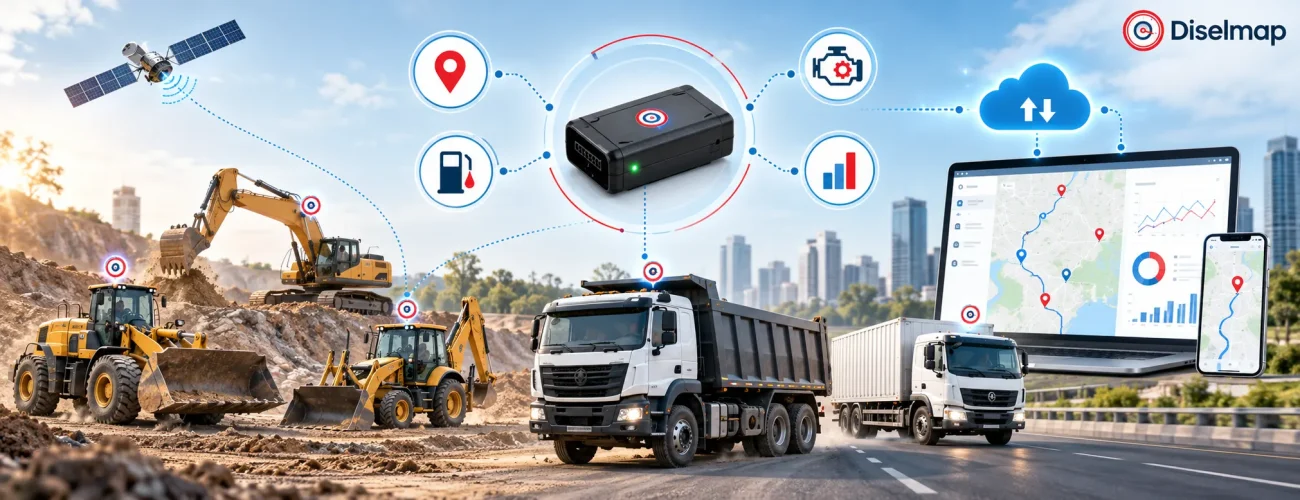
Modern fleet management requires more than knowing where a vehicle is.Fleet managers also need to understand how vehicles are operating, where unnecessary stops occur, how long engines are running, whether drivers are following expected routes and whether vehicle conditions require attention.A telematics device connects vehicles and equipment with digital fleet software. It collects selected location, vehicle and sensor data and sends that information to a cloud platform where fleet teams can review maps, alerts, reports and historical activity.
For commercial fleets, telematics can bring together information from GPS, ignition, CAN Bus, sensors and other compatible vehicle systems.The objective is not to collect as much data as possible.It is to collect the information that helps fleet managers make better operational decisions.
What Is Telematics?
Telematics is the technology used to collect vehicle or equipment data, transmit it remotely and turn that data into useful operational information.
A typical fleet telematics setup may involve:
- GPS or GNSS positioning
- A telematics device
- Vehicle or engine data
- Mobile network connectivity
- Cloud software
- Sensors
- Fleet-management dashboards
In practical fleet operations, telematics can help answer questions such as:
Where is the vehicle?
How is it being operated?
How long has the engine been running?
Has it stopped unexpectedly?
Is a driver following the planned route?
Are fuel, engine or vehicle events showing unusual patterns?
The telematics device is the hardware that connects the vehicle to this broader digital system.
Key Takeaways
- A telematics device connects a vehicle with cloud-based fleet software.
- It can combine GPS, ignition, engine, CAN Bus and compatible sensor data.
- Telematics goes beyond basic vehicle location.
- Fleet managers can use the data for tracking, route monitoring, driver activity, fuel visibility, maintenance and utilization.
- Available information depends on the vehicle, device and integration.
- Telematics works best when fleets collect data tied to clear operational goals.
What Is a Telematics Device?
A telematics device is electronic hardware installed in or connected to a vehicle or equipment asset.
Its main job is to collect selected information and transmit it to a remote software platform.
Depending on the vehicle and installation, it may collect information such as:
- Vehicle location
- Speed
- Ignition status
- Distance travelled
- Trip history
- Engine hours
- Idle time
- Driver behaviour events
- CAN Bus information
- Fuel-related data
- External sensor information
The device acts as the connection between the vehicle and a fleet management system.
A simple way to understand the process is:
Vehicle & Sensors → Telematics Device → Mobile Network → Cloud Platform → Fleet Software → Alerts & Reports
The hardware collects and transmits the information.
The software makes that information useful.
How Does a Telematics Device Work?
Although device capabilities vary, most fleet telematics systems follow a similar process.
1. The Device Identifies Vehicle Location
Most telematics devices include GPS or another satellite-positioning technology.
This can provide information such as:
- Current location
- Vehicle movement
- Route travelled
- Speed
- Stops
- Distance travelled
Location information forms the foundation of many GPS tracking systems.
2. It Collects Vehicle Information
The device may also connect directly with the vehicle or compatible external sensors.
Depending on the setup, information may come from:
- Ignition wiring
- CAN Bus
- OBD interface
- Digital inputs
- Analogue inputs
- Fuel sensors
- Temperature sensors
- Other compatible devices
This is what allows telematics to go beyond simple location tracking.
3. It Transmits the Data
The information is typically transmitted through a mobile network or another supported communication method.
Data may be sent:
- At defined intervals
- When the vehicle starts
- When the vehicle stops
- When a particular event occurs
- When an alert condition is detected
If connectivity is temporarily unavailable, some devices can store data and send it later when communication returns.
4. Cloud Software Processes the Information
Once the data reaches the cloud platform, fleet software organizes it into information fleet teams can actually use.
Managers may be able to view:
- Live vehicle locations
- Trip history
- Vehicle activity
- Driver events
- Alerts
- Reports
- Engine hours
- Fuel trends
- Utilization information
This is where raw vehicle data becomes operational information.
Main Components of a Telematics Device
A modern telematics device can contain several hardware components.
| Component | Main Role |
|---|---|
| GPS/GNSS receiver | Determines vehicle location and movement |
| Communication module | Sends data to the remote platform |
| Processor | Processes vehicle, GPS and sensor information |
| Internal memory | Stores information temporarily |
| Accelerometer | Detects selected movement events |
| Vehicle interface | Connects with ignition, OBD, CAN or inputs |
| External sensor interface | Adds fuel, temperature or other sensor data |
GPS or GNSS Receiver
This component helps determine the vehicle’s location.
It can support:
- Live tracking
- Route history
- Speed
- Stops
- Distance travelled
Communication Module
The communication module sends vehicle data to the remote platform.
Cellular connectivity is commonly used in fleet telematics.
Processor
The processor manages information collected from GPS, vehicle systems and sensors.
It may also identify specific events before sending data to the server.
Internal Memory
Some devices can temporarily store data when network coverage is unavailable.
That information can then be transmitted once connectivity returns.
Motion Sensor
An accelerometer can detect changes in vehicle movement.
Depending on the platform, this may help identify:
- Harsh braking
- Rapid acceleration
- Sharp cornering
Vehicle Interfaces
Compatible devices may connect with:
- CAN Bus
- OBD
- Ignition wiring
- Fuel sensors
- External sensors
- Digital inputs
- Analogue inputs
The exact interfaces available depend on the hardware and vehicle.
Telematics Device vs GPS Tracker
A GPS tracker and a telematics device are related technologies, but they are not always the same.
| Feature | GPS Tracker | Telematics Device |
|---|---|---|
| Vehicle location | Yes | Yes |
| Route history | Yes | Yes |
| Speed monitoring | Yes | Yes |
| Geofencing | Usually | Usually |
| Driver behaviour | Limited | Can be supported |
| Engine hours | Limited | Can be supported |
| CAN Bus integration | Usually limited | Possible |
| Fuel sensor integration | Limited | Possible |
| Vehicle diagnostics | Limited | Can be supported |
| Fleet analytics | Basic | More detailed |
A GPS tracker primarily answers:
Where is the vehicle?
A broader telematics system can help answer:
Where is the vehicle, how is it operating and what other vehicle information is available?
That is the key difference.
What Data Can a Telematics Device Collect?
The available data depends on the vehicle, device, sensors and integration.
| Data Type | What It Helps Fleet Managers Understand |
|---|---|
| GPS location | Where the vehicle is |
| Route history | Where the vehicle travelled |
| Speed | How fast it was moving |
| Ignition status | Whether the vehicle was operating |
| Engine hours | How long the engine was running |
| Idle time | Stationary engine-on time |
| Driver events | Selected driving patterns |
| CAN Bus data | Supported vehicle operating information |
| Fuel information | Fuel level or activity when integrated |
| Sensor information | Additional operating conditions |
Not every fleet needs every available data point.
The goal should be to collect information that supports useful decisions.
Examples of Telematics in Fleet Management
Fleet telematics can be used in many different ways.
Common examples include:
- GPS vehicle tracking
- Route monitoring
- Geofencing
- Idle-time monitoring
- Driver behaviour monitoring
- Engine-hour tracking
- Fuel level monitoring
- CAN Bus monitoring
- Vehicle diagnostics
- Maintenance alerts
- TPMS integration
- Dashcam and video telematics
- Temperature monitoring
- Equipment utilization
Different fleets will use different combinations.
A logistics fleet may focus heavily on routes and driver activity.
A construction fleet may care more about engine hours, equipment utilization and fuel consumption.
Benefits of Telematics in Fleet Management
Telematics becomes valuable when data helps solve a practical fleet problem.
Better Vehicle Visibility
Fleet managers can see where vehicles are operating from a centralized platform.
This reduces the need for repeated calls simply to determine vehicle location.
It can also improve coordination between drivers, dispatch teams and fleet managers.
Better Trip and Route Monitoring
Telematics systems can record:
- Trip start
- Trip end
- Distance
- Stops
- Route
- Travel time
This helps fleet managers compare planned routes with actual vehicle activity.
Potential issues may include:
- Route deviations
- Unplanned stops
- Delays
- Unusual movement
Geofence-Based Monitoring
A geofence is a virtual boundary around a location.
Fleet teams can create geofences around:
- Depots
- Warehouses
- Customer sites
- Construction projects
- Fuel stations
- Restricted areas
The platform can record when vehicles enter or leave these locations.
Better Driver Safety Visibility
Depending on the telematics setup, the system may identify driving events such as:
- Overspeeding
- Harsh braking
- Rapid acceleration
- Sharp cornering
- Excessive idling
This information can complement driver behaviour monitoring and driver coaching.
Better Fuel Visibility
A telematics device can work with compatible fuel-monitoring hardware.
Depending on the configuration, a fuel management system may help fleet teams review:
- Fuel level
- Refuelling activity
- Sudden fuel drops
- Fuel consumption trends
- Idle-related fuel use
Fuel data becomes more useful when combined with trip, route and engine information.
Engine-Hour Monitoring
Engine hours are particularly useful for heavy equipment and vehicles that may operate for long periods without travelling far.
For example, an excavator can work on one construction site throughout a shift.
Mileage may remain low while engine hours increase significantly.
Engine-hour data can therefore support:
- Utilization analysis
- Maintenance planning
- Service scheduling
Better Asset Utilization
Telematics can help identify whether vehicles and equipment are being actively used.
Fleet managers can compare:
- Operating hours
- Engine hours
- Trips
- Idle time
- Asset movement
This can help identify underused assets or equipment with unusually low activity.
Vehicle Health Visibility
Compatible vehicles may provide selected operating or diagnostic information.
This can give fleet managers additional context for maintenance planning.
The amount of available vehicle data depends on the actual vehicle and integration.
How Telematics Works with CAN Bus
CAN Bus is a communication network used inside many modern vehicles.
Different electronic control units exchange information over this network.
A compatible telematics device may be able to read selected CAN Bus data.
Depending on the vehicle, this may include:
- Engine operating information
- Vehicle speed
- Engine hours
- Fuel-related parameters
- Electrical data
- Diagnostic information
However, CAN Bus data is not identical across every manufacturer or vehicle model.
Fleet operators should confirm compatibility before expecting specific parameters.
For a deeper explanation, see CAN Bus monitoring for commercial fleets.
What Can Fleet Telematics Integrate With?
Fleet telematics can become more useful when connected with compatible vehicle systems and sensors.
Possible integrations include:
GPS Tracking
GPS provides vehicle location and movement history.
Fuel Level Sensors
Fuel sensors can add tank-level information, refuelling events and selected fuel activity.
CAN Bus
CAN integration can provide additional vehicle operating data where supported.
TPMS
A Tyre Pressure Monitoring System can add tyre-pressure and temperature information.
Dashcams and Vehicle Cameras
Connected cameras can provide visual context around driving or safety events.
Temperature Sensors
These can be useful for temperature-sensitive fleet operations.
Driver Monitoring
Driver data may be combined with vehicle information for broader safety analysis.
The objective is not to connect every possible device.
Integrations should be selected according to the fleet problem being solved.
Where Is Fleet Telematics Used?
Telematics can support many types of vehicles and mobile equipment.
Logistics and Commercial Fleets
Trucks, buses, tankers, delivery vehicles and service fleets may use telematics for:
- Vehicle tracking
- Trip monitoring
- Routes
- Driver activity
- Fuel monitoring
- Utilization
- Reporting
Construction and Heavy Equipment
Construction fleets may include:
- Excavators
- Backhoe loaders
- Wheel loaders
- Tippers
- Concrete mixers
- Road rollers
- Cranes
For these assets, useful information may include:
- Equipment location
- Engine hours
- Operating time
- Idle time
- Fuel activity
- Site movement
- Utilization
For example, knowing where an excavator is located is useful.
Knowing that it operated for only a few hours during an entire shift can be even more useful.
Mining Fleets
Mining operations may use telematics to review:
- Vehicle location
- Equipment hours
- Utilization
- Fuel activity
- Movement inside operational zones
- Maintenance intervals
This can help central teams monitor multiple assets across large or remote sites.
Oil and Gas Fleets
Oil and gas fleets may operate across long routes and remote locations.
Telematics can support visibility into:
- Vehicle movement
- Route history
- Driver activity
- Engine hours
- Fuel behaviour
- Utilization
Bus and Passenger Fleets
Passenger fleets may use telematics for:
- Route monitoring
- Vehicle location
- Trip history
- Driver activity
- Schedule visibility
- Fleet reporting
The correct setup depends on the actual operating environment.
Telematics Hardware vs Telematics Software
Fleet managers should understand the difference between the hardware and the platform.
Telematics Hardware
The hardware is installed in or connected to the vehicle.
It:
- Collects data
- Reads supported vehicle information
- Detects events
- Connects to sensors
- Sends information
Telematics Software
The software receives, organizes and displays that information.
It may provide:
- Maps
- Reports
- Dashboards
- Alerts
- Historical data
- Fleet analytics
A simple way to remember the difference is:
Hardware collects the data.
Software makes the data useful.
Both are important parts of a complete fleet telematics system.
What Should Fleet Managers Look for in a Telematics Device?
Selecting a telematics device should begin with operational requirements.
Vehicle Compatibility
Check whether the hardware supports the fleet’s vehicle types.
Mixed fleets may include:
- Trucks
- Buses
- Older commercial vehicles
- CAN-enabled vehicles
- Construction equipment
The same installation may not work equally well on every asset.
Required Data
Start by deciding what information is actually needed.
For example:
- GPS location
- Engine hours
- Driver behaviour
- Fuel monitoring
- CAN Bus information
- Vehicle diagnostics
This prevents unnecessary complexity.
Sensor Compatibility
If the fleet needs fuel, temperature or other sensor-based information, confirm that the device can integrate with the required hardware.
Network Connectivity
Vehicles may travel through areas with different levels of mobile coverage.
The telematics device should suit the fleet’s real operating environment.
Installation Method
Some devices connect through diagnostic ports.
Others require professional hardwired installation.
Heavy equipment and sensor integrations may require additional work.
Software Platform
Hardware is only one part of the system.
Fleet managers should also evaluate whether the software provides:
- Clear dashboards
- Useful reports
- Relevant alerts
- Vehicle history
- Easy fleet monitoring
Scalability
A system that works for 20 vehicles should remain manageable if the fleet later grows to 100, 500 or more assets.
How Is a Telematics Device Installed?
Installation depends on the vehicle and selected hardware.
Common methods include:
- Hardwired installation
- Diagnostic-port connection
- CAN Bus connection
- OEM interface
- External sensor integration
After installation, the device is associated with the correct vehicle in the fleet platform.
The system should then be tested to confirm that the required information is being received correctly.
What Happens After Installation?
Installing the hardware is only the beginning.
Fleet teams should configure the platform according to actual operating requirements.
Typical steps include:
- Add the vehicle to the platform.
- Confirm GPS communication.
- Verify ignition status.
- Configure vehicle information.
- Create required geofences.
- Set useful alerts.
- Connect supported sensors.
- Verify vehicle data.
- Configure reports.
- Decide which metrics will be reviewed regularly.
The objective should remain simple:
Collect useful data, not unnecessary data.
Common Mistakes Fleet Managers Should Avoid
Telematics can produce a large amount of information.
Poor configuration can make that information less useful.
Tracking Too Many Metrics
More data does not automatically mean better fleet management.
Choose metrics connected to specific operational goals.
Creating Too Many Alerts
If managers receive constant notifications, important events may eventually be ignored.
Alerts should be reserved for situations that require attention.
Ignoring Historical Data
Live information is useful, but historical data can reveal patterns across:
- Vehicles
- Drivers
- Routes
- Fuel usage
- Engine hours
- Utilization
Using the Same Configuration for Every Vehicle
A city delivery van and a mining excavator perform completely different jobs.
Their telematics configuration should reflect those differences.
Choosing Hardware Before Defining the Requirement
Do not begin with:
Which device has the most features?
Start with:
What information does our fleet actually need?
Then choose the hardware.
Limitations of Fleet Telematics
Telematics provides valuable fleet visibility, but it has practical limitations.
Vehicle Compatibility
Not every vehicle exposes the same engine or CAN Bus data.
Mobile Network Coverage
Remote or low-coverage areas may delay data transmission.
Sensor Accuracy
External data quality depends on the sensor, installation and calibration.
Installation Quality
Incorrect installation can create unreliable information or missing events.
Data Configuration
Poor thresholds or excessive alerts can reduce the usefulness of the platform.
Human Follow-Up Is Still Required
A telematics platform can identify a problem.
It cannot automatically fix poor routing, driver behaviour, maintenance delays or inefficient operating processes.
Fleet teams still need to review information and act on it.
Example: How Telematics Adds Context to a Vehicle Stop
Consider a truck that has been stationary for 30 minutes.
A basic GPS system may show:
The truck is at this location.
A broader telematics platform may provide additional context:
- Ignition is on
- Engine is running
- Vehicle has been idling for 30 minutes
- Stop is outside the expected route
- Fuel is still being consumed
That difference illustrates the real value of telematics.
It adds context to vehicle activity.
How Diselmap Supports Fleet Telematics
Diselmap helps commercial fleet operators connect vehicles, equipment and operating information through integrated fleet technology.
Depending on fleet requirements and compatible hardware, Diselmap solutions can support:
- GPS tracking
- Fleet telematics
- Fleet management
- Driver behaviour monitoring
- Fuel monitoring
- CAN Bus monitoring
- TPMS
- Fleet analytics and maintenance visibility
The aim is to help fleet teams move beyond basic location tracking and gain a clearer understanding of how vehicles and equipment are operating.
Frequently Asked Questions
What is a telematics device?
A telematics device is electronic hardware installed in or connected to a vehicle. It collects selected location and vehicle information and sends that data to remote fleet software.
What does a telematics device track?
A telematics device can track GPS location, speed, trip distance, ignition status, engine hours, idle time and selected driver events. Compatible integrations may also provide CAN Bus, fuel, temperature or diagnostic information.
Is a telematics device the same as a GPS tracker?
Not always. A GPS tracker mainly focuses on vehicle location and movement. A telematics device can combine location with additional vehicle, engine, driver and sensor information.
What is fleet telematics?
Fleet telematics is the use of connected vehicle technology to collect and analyse vehicle location, operating and sensor information across a commercial fleet.
Can telematics monitor fuel?
Yes, when compatible fuel-monitoring hardware or supported vehicle data is available. The exact information depends on the vehicle and installation.
Can telematics devices monitor driver behaviour?
Compatible systems can detect selected events such as overspeeding, harsh braking, rapid acceleration, sharp cornering and excessive idling.
Can telematics help with maintenance?
Yes. Information such as mileage, engine hours, supported diagnostic data and vehicle history can provide useful context for preventive maintenance planning.
Does a telematics device need mobile connectivity?
Most connected telematics devices use mobile connectivity to send information to the cloud. Some devices can temporarily store data when coverage is unavailable and upload it later.
Conclusion
A telematics device connects a vehicle with a digital fleet-management environment.
It can combine GPS location, vehicle information, sensors and communication technology to help fleet managers understand what is happening across vehicles and equipment.
But the real value of telematics is not simply the amount of information it can collect.
Its value comes from turning vehicle activity into useful operational context.
For commercial fleets, construction equipment, mining operations and other mobile assets, that can mean better visibility into:
- Vehicle movement
- Routes
- Driver activity
- Engine hours
- Fuel information
- Utilization
- Vehicle condition
The strongest telematics strategy therefore begins with a simple question:
What information will help our fleet make better decisions?
Once that is clear, the right hardware, integrations, alerts and reports become much easier to choose.
Connect Your Fleet with Diselmap Telematics
Diselmap provides connected fleet technology designed to give businesses better visibility across commercial vehicles and equipment.
Combine GPS tracking, fleet telematics, fuel monitoring, driver behaviour, CAN Bus data and fleet analytics in a setup built around your actual operating requirements.
Whether you manage logistics trucks, buses, construction equipment or specialised fleets, the right telematics configuration can help turn vehicle data into clearer operational decisions.