
- Oil & Gas Fleet Telematics
Oil & Gas Fleet Telematics: Connected Vehicle & Asset Visibility
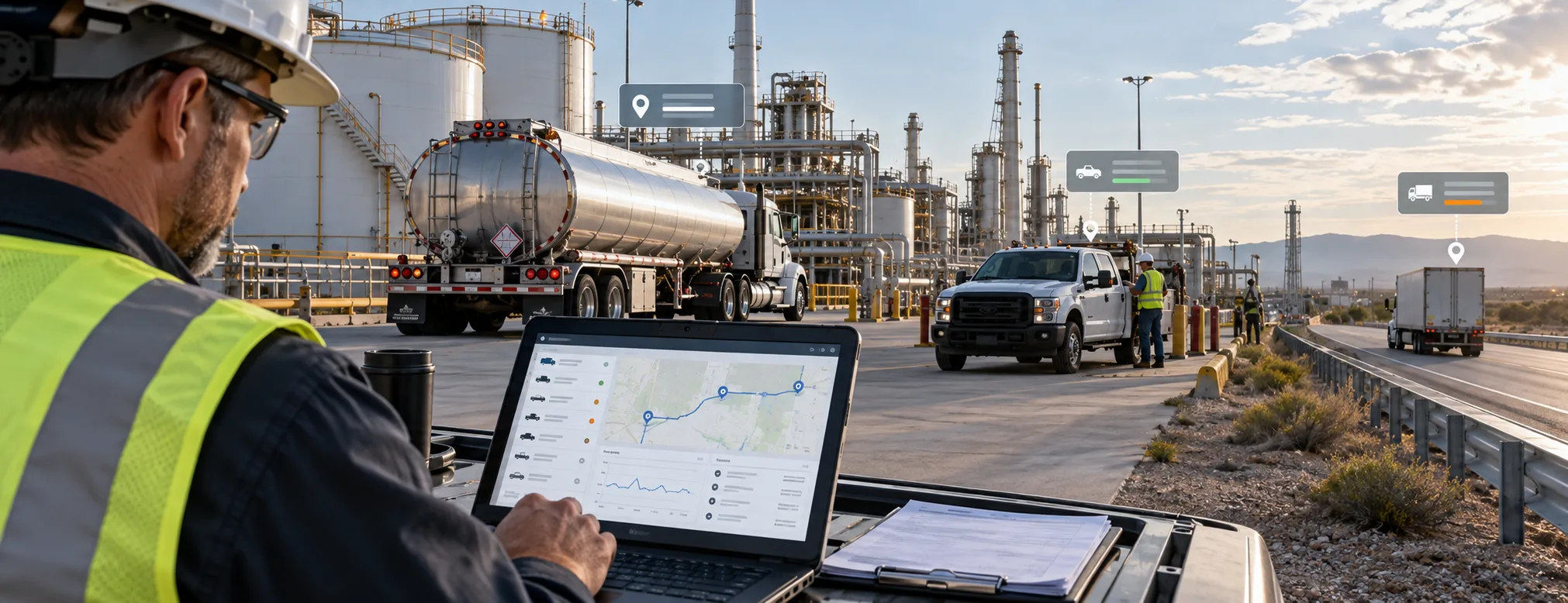
Oil and gas fleets often operate across highways, terminals, project sites, depots, and remote field locations.Tankers may travel long routes, service vehicles may move between multiple sites, and support fleets can operate far from a central office. In these conditions, relying only on calls, manual records, and separate systems can make fleet visibility difficult.
Oil and gas fleet telematics combines GPS tracking with selected vehicle, trip, driver, and operational data to give fleet managers a clearer view of how connected vehicles are moving and operating.Depending on the vehicle, installed hardware, and system configuration, telematics may provide information about location, trips, speed, driving events, ignition status, and selected vehicle or engine data
Quick Answer
Oil and gas fleet telematics connects GPS, vehicle data, and telematics devices to help businesses monitor vehicle location, trips, driving events, and selected operating information across tankers, service fleets, and field operations.
What Is Oil & Gas Fleet Telematics?
Fleet telematics uses connected vehicle hardware, communication networks, and software to collect and transmit operational information from commercial vehicles.
A telematics system may use data from:
- GPS tracking devices
- Vehicle sensors
- CAN Bus systems
- Driver-event data
- Ignition status
- Trip records
- Compatible cameras
- Connected IoT devices
The available information is sent to a fleet platform where authorized users can review current activity and historical records.
For oil and gas businesses, telematics can support:
- Tanker transportation
- Fuel distribution fleets
- Field-service vehicles
- Maintenance fleets
- Depot-to-site movement
- Remote operational fleets
For product-level functionality, visit Diselmap’s Vehicle Telematics Solutions.
Why Connected Fleet Visibility Matters
Oil and gas operations may involve many vehicles working across different locations at the same time.
Without connected data, important information can be spread across dispatch calls, trip sheets, vehicle records, maintenance systems, and separate tracking tools.
Telematics helps bring selected vehicle and trip information together.
Monitor Vehicle Location
Fleet managers can see where connected vehicles are operating and review current movement.
Review Trip Activity
Trip data can show routes, journey history, stops, and selected location events.
Understand Driving Events
Compatible systems may identify events such as speeding, harsh braking, rapid acceleration, sharp cornering, or excessive idling.
Add Vehicle Context
Where supported, vehicle systems may provide selected engine, ignition, diagnostic, or operating information.
Build Historical Records
Historical data makes it easier to review recurring patterns instead of relying only on live information.
This can help fleet teams improve operational visibility without assuming that every individual event represents a problem.
How Oil & Gas Fleet Telematics Works
A typical telematics workflow can be explained in four stages.
1. Collect Vehicle Data
A connected telematics device receives selected information from GPS, supported vehicle systems, or installed sensors.
The exact information available depends on the vehicle and deployment.
2. Transmit the Information
The device sends data through an available communication network to the connected fleet platform.
Transmission speed may vary in remote areas depending on network availability.
3. Organize Fleet Activity
The platform converts incoming information into useful records such as:
- Vehicle locations
- Routes
- Trips
- Stops
- Speed events
- Driving events
- Vehicle status
- Historical reports
4. Review and Act
Fleet teams can review current activity, investigate exceptions, compare historical patterns, and use the information to support operational decisions.
Telematics supports decision-making. It does not replace driver communication, operating procedures, or human judgement.
What Data Can Fleet Telematics Provide?
The type of data available depends on the installed hardware, vehicle compatibility, and selected integration.
GPS and Location Data
GPS can provide information such as:
- Current vehicle location
- Route history
- Trip activity
- Stops
- Geofence events
- Vehicle movement history
For detailed tracking functionality, see Diselmap’s GPS Tracking System.
Driver Event Data
Compatible systems may record selected driving events such as:
- Speeding
- Harsh braking
- Rapid acceleration
- Sharp cornering
- Excessive idling
These events can support performance reviews when interpreted together with trip and historical context.
For dedicated driver scorecards and coaching workflows, visit the Driver Behavior Monitoring System.
Vehicle and Engine Data
Some vehicles and telematics integrations may provide selected information such as:
- Engine RPM
- Vehicle speed
- Ignition status
- Diagnostic information
- Selected engine parameters
- Fuel-related vehicle data
Availability varies by manufacturer, model, ECU, protocol, and installed hardware.
Telematics for Oil & Gas Fleet Operations
Different fleet environments require different levels of connected information.
Tanker Transportation
Telematics can add trip, route, driver-event, and selected vehicle information to tanker tracking.
Fleet teams may review tanker movement, routes, stops, trip history, and supported driving events.
For tanker-specific GPS tracking, read the Oil Tanker Tracking System guide.
Field-Service Fleets
Service vehicles may move between depots, plants, project sites, and remote operational areas.
Connected trip and vehicle data can help managers understand vehicle movement and operating activity across these journeys.
Maintenance and Support Vehicles
Maintenance fleets often work across multiple facilities.
Telematics can provide better visibility into vehicle location, trip history, and selected operating data.
Remote Operations
Vehicles in remote areas can be difficult to supervise directly.
Telematics can provide additional visibility when suitable hardware and communication coverage are available.
GPS Tracking vs Telematics
GPS tracking and telematics are closely related, but they are not the same.
| GPS Tracking | Vehicle Telematics |
|---|---|
| Focuses mainly on location | Combines location with additional vehicle data |
| Shows routes | Can add vehicle operating information |
| Records trips | Can include driver-event data |
| Supports geofencing | Can connect with compatible vehicle systems |
| Tracks movement | Provides broader operational context |
A simple distinction is:
GPS tracking tells you where the vehicle is.
Telematics can provide additional information about how the vehicle is operating.
GPS commonly forms part of a telematics solution, but telematics may use additional data sources.
How CAN Bus Data Adds Vehicle Context
Some telematics deployments can connect with a vehicle’s CAN Bus to access selected vehicle or engine information.
Where supported, this may include data such as:
- Engine RPM
- Vehicle speed
- Ignition information
- Selected diagnostics
- Fuel-related parameters
However, the exact information available varies between vehicles.
Compatibility can depend on:
- Vehicle make
- Vehicle model
- Manufacturing year
- ECU configuration
- Communication protocol
- Installed telematics hardware
Businesses should confirm actual vehicle compatibility before assuming specific CAN Bus data will be available.
For detailed information about vehicle-data integration, visit Diselmap’s CAN Bus Systems.
Practical Example: Monitoring a Field-Service Vehicle
Consider a service vehicle travelling from a depot to a remote oil and gas facility.
Vehicle Leaves the Depot
GPS records the start of the trip and vehicle movement.
Trip Activity Is Recorded
The telematics platform records route information, stops, and selected vehicle or driver events.
A Driving Event Occurs
The system records a harsh braking event.
Instead of treating the event as a conclusion by itself, the fleet manager can review:
- Location
- Time
- Route
- Trip history
- Previous driving events
This provides useful context before deciding whether follow-up is needed.
Vehicle Arrives at the Site
A configured geofence may record the vehicle entering the operational location.
Historical Performance Is Reviewed
Over time, fleet managers can compare trips and event patterns to identify recurring operational trends.
This is where telematics becomes more useful than isolated real-time alerts.
Telematics and Driver Performance
Driving-event information can support fleet managers when reviewing recurring driver behaviour.
Examples may include:
- Frequent speeding
- Repeated harsh braking
- Rapid acceleration
- Long idling periods
- Sharp cornering
However, one event should not automatically define a driver as unsafe.
Traffic, road conditions, emergency situations, vehicle load, and operating environments can all affect driving behaviour.
Historical trends and trip context usually provide a better basis for coaching and driver review.
For deeper analysis, use the dedicated Driver Behavior Monitoring System.
Telematics and Fuel Monitoring
Telematics and fuel monitoring can work together, but they serve different purposes.
Telematics focuses on connected vehicle, trip, and operational information.
Fuel monitoring focuses on fuel levels, consumption trends, refuelling activity, and significant fuel changes.
When compatible systems are integrated, a fuel event may be reviewed alongside:
- Vehicle location
- Trip activity
- Time
- Driving events
- Vehicle operation
For a detailed explanation, read Fuel Monitoring for Oil & Gas Fleets.
Telematics vs Fleet Management System
Telematics mainly provides connected vehicle data.
A broader fleet management system can combine multiple types of operational information, including:
- GPS tracking
- Telematics
- Driver information
- Maintenance
- Alerts
- Trips
- Fuel information
- Reports
Telematics can therefore act as one important data source within a larger fleet-management environment.
For the broader platform, visit Diselmap’s Fleet Management System.
Challenges and Limitations of Fleet Telematics
Telematics can improve fleet visibility, but businesses should also understand its limitations.
Network Connectivity
Data transmission depends on available communication coverage.
Vehicles working in remote areas may experience delayed data transmission.
Vehicle Compatibility
Not every vehicle supports the same information.
Older vehicles or different manufacturers may provide different levels of access.
Hardware Configuration
The type and quality of available information depend on the installed device and integration.
CAN Bus Availability
Vehicle data must be confirmed for each make and model before deployment.
Data Needs Context
A system may show that an event occurred, but it may not explain why it happened.
Operational review is still important.
Excessive Alerts Can Reduce Value
Too many low-value notifications can make important events harder to identify.
Fleet teams should configure alerts around genuine operational priorities.
How to Choose a Telematics System for Oil & Gas Fleets
Define What You Need to Monitor
Start with the operational requirement.
Identify whether the fleet needs location tracking, driver events, vehicle data, diagnostics, or a combination.
Check Vehicle Compatibility
Confirm which vehicles, models, protocols, and data sources are supported.
Evaluate Trip and Location Reporting
The system should provide useful route, trip, stop, and historical information for normal operating conditions.
Review Driver-Event Capabilities
Confirm which driving events the installed hardware can actually detect.
Verify Vehicle-Data Integration
If CAN Bus or diagnostic data is required, check the available parameters before deployment.
Review Historical Reports
Fleet managers should be able to compare activity over time rather than seeing only current information.
Consider Integration
Where relevant, confirm whether the system can work with:
- Fleet management
- Fuel monitoring
- Driver monitoring
- CAN Bus
- Dashcams
- Other connected fleet systems
Evaluate Installation and Support
Hardware installation, configuration, onboarding, and technical assistance are important parts of a reliable deployment.
Frequently Asked Questions About Oil & Gas Fleet Telematics
What is oil and gas fleet telematics?
Oil and gas fleet telematics uses connected vehicle devices, GPS, and compatible vehicle data to provide information about vehicle location, trips, driving events, and selected operating conditions across tanker, service, and field fleets.
Is telematics the same as GPS tracking?
No. GPS tracking mainly focuses on vehicle location and movement. Telematics can combine GPS data with additional vehicle, driver, and operating information.
What vehicle data can telematics monitor?
Depending on vehicle and hardware compatibility, telematics may provide location, speed, trip information, ignition status, driving events, and selected engine or diagnostic data.
Can telematics monitor driver behaviour?
Compatible systems can record selected events such as speeding, harsh braking, rapid acceleration, sharp cornering, and excessive idling.
Can telematics connect with CAN Bus?
Yes, where the vehicle, protocol, and telematics hardware are compatible. The available vehicle parameters vary between manufacturers and models.
Can telematics work in remote oil and gas locations?
Telematics can collect vehicle data in remote operations, but real-time transmission depends on communication coverage and hardware configuration.
Does telematics replace a fleet management system?
No. Telematics mainly provides connected vehicle information. A fleet management system can combine telematics with maintenance, fuel, drivers, reports, alerts, and other operational workflows.
How Telematics Fits into Oil & Gas Fleet Management
Telematics is one part of a broader connected fleet environment.
Oil and gas operations may combine:
- GPS tracking
- Vehicle telematics
- Fuel monitoring
- Driver behaviour monitoring
- CAN Bus integration
- Dashcams
- Maintenance information
- Remote asset monitoring
Each technology should have a clear role.
Telematics should primarily provide connected vehicle and operational data, while broader fleet-management systems bring different information sources together.
For the complete industry-level solution, explore Diselmap’s Oil & Gas Fleet Management Solutions.
Conclusion
Oil and gas fleet telematics gives fleet teams a more connected view of how vehicles are moving and operating across tanker transport, service fleets, and remote field operations.
By combining GPS with selected trip, driver, and vehicle information, telematics can provide more useful context than location data alone.
Its value does not come from collecting every possible data point. It comes from collecting relevant information, reviewing it in context, and using it to support better operational decisions.
Because available data depends on vehicle compatibility, hardware, connectivity, and system configuration, businesses should confirm the actual capabilities required for their fleet before deployment.
Connect Your Oil & Gas Fleet with Diselmap
Diselmap helps businesses monitor fuel activity across compatible commercial vehicles and equipment using connected sensors, telematics, GPS tracking, and fleet technology.
Review fuel levels, consumption patterns, refuelling activity, and selected fuel events through a centralized platform configured around your operational requirements.